Can I extract the Part Number property from the file name?
Yes. This can be done with a “Property Assignment Rule”.:
-
Maintain > Property Assignment Rules…
-
Press the Add… button
-
Fill in the dialog like this:
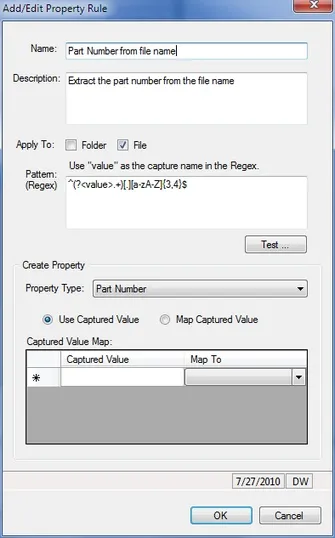
The Regex pattern is shown below (to make it easy to copy/paste). The (?<value> ... ) parenthetical portion defines what is
“captured” (in this case, one or more characters (.+) before the three or four character file extension):
^(?<value>.+)[.][a-zA-Z]{3,4}$
Then you can use the Assets > Apply Property Rules… function to assign the Part Number property for all (or selected) assets in your catalog.
If you want the pattern to apply only to known image types, you could use a pattern like this:
(?i)^(?<value>.+)[.](JPG|TIF|PNG)$
Notice that the (?i) prefix makes the pattern match case-insensitive so it would match upper or lower case file name extensions.