What is AcePrint
AcePrint is a powerful PDF generation tool that creates complete printed catalogs from structured application and product data.
It uses a “report generator” approach to create pdf pages by extracting information from one or more files and presenting that information in a specified format. The AcePrint screens define the layout (i.e. presentation) of that information.
AcePrint is designed to allow a user to define the catalog once and then simply refresh the data and generate the catalog without any further user interaction.
You have complete control over page layout, format style, borders, fills, footnote references, tag processing, in-cell images, grouping, empty value display and more.
The “Tree” on the left controls the generation (and order) of the catalog:
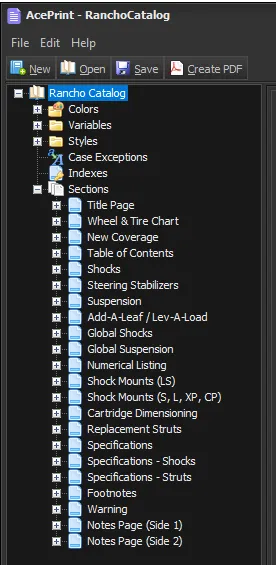
Each “Section” (“Title Page”, “Wheel & Tire Chart”, etc.) is generated, in order, to create the finished book. If you are working on just one section, you can “Disable” all the other sections so only the one you want is created. If a section is disabled, it will have a line through it and the “Enabled” check box is unchecked.
Each Section can contain a combination of “static” and table-driven text. Static text is provided within the AcePrint screens. Table-driven text is pulled from an external Access database or Text file.
Static text in AcePrint is very much like “Master Pages” in the Desktop Publishing world. For example, if you want a heading to appear on every page in the section, you could add a static element like “Page Title”.