Showing ID values instead of Text values
There is no way for AceViewer to show both id values and text values at the same time, but you can force it to just show only the id values.
Use the attached empty VCdb.mdb (and PCdb if you want the part type ids too). AceViewer will show ids if it can’t find an entry in the VCdb.
To remove the angle brackets surrounding ids, go to File > Settings… and remove them from the “Missing Value Display Format”:
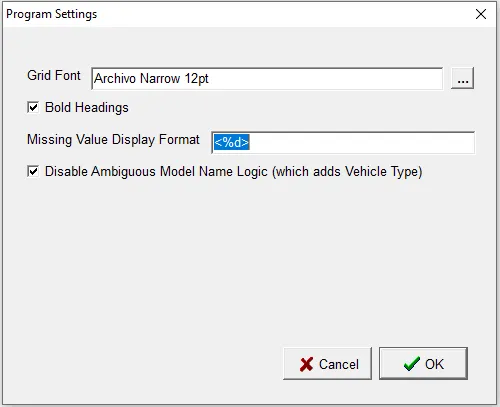
The “%d” is a placeholder for the id value. So you could include “id=%d” to get something like “id=2521”, for example.
Here we’ve kept the angle brackets (but you will probably want to remove them):

You can also use View > Separate Columns to separate the ids into their own columns, and View > Hide Empty Columns to remove extraneous information.

Note that the id values for BaseVehicle are placed in the “Years” column and the id values for EngineBase are placed in the “Block” column.