What’s New in AceViewer 2.1
AceViewer 2.1
- Added support for tab-delimited export if filename ends in “.txt”
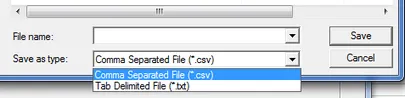
In addition to the current .csv export, we have added an option to create a standard tab-delimited file. The file name determines the file type. If you use .txt, it is a tab-delimited file, if you use .csv, it will be quote-comma separated values. The Save dialog has the file type option in a drop-down:
- Added an option to generate a unique “App Fingerprint” (representing all application data except the app id and ref) on each exported row
We had some customers ask how they might compare two ACES xml files. We don’t have that feature built in (yet), but we did add the ability to create a single value (App Fingerprint) that could be used as a primary key to identify the application.
So, for example, you could generate two exports (one for each file you wanted to compare) and bring them both into Access. You could then easily join on that primary key to see what is in one file and not in the other (both directions). This is just one “use case.” There are many opportunities this enables now that you can uniquely identify an application with a single key.
This App Fingerprint is not included in an ACES xml file. ACES does have an app id that is delivered, but it’s not unique and usually is just a sequential number in the xml file.
The fingerprint is actually a 128 bit MD5 cryptographic hash of all the fields on the application. It is not 100% statistically guaranteed that two applications won’t have the same hash, but the likelihood is almost nil.
- Added ability to export separate application rows for each “ref” found in a list of refs (separated by a comma, space or semicolon)
If you select this option on the new Export dialog (only enabled if your ACES file uses the “ref” attribute), it will split apart any “ref lists” (such as ref=“123, 456, 789”) into rows with a single ref on them. This makes it very easy to load into a database and join to your source data so you can see your source and the ACES matching ACES output.