Remote Access Configuration
Many of our products use a two-tier (client/server) technology, so all information must travel between client and server. Something that takes just a few minutes locally could take hours across the Internet. There are several long running processes that would fall into this category (i.e. not simple create/read/update/delete operations on individual rows).
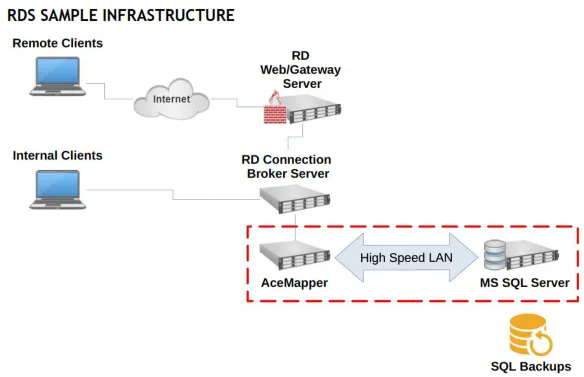
We support several installation configurations. The one we recommend for remote access is Microsoft Remote Desktop Services (RDS) (although TSPlus and Citrix are alternatives).
RDS machines can be securely accessed using SSH tunneling (so you do not need to open the RDS port to the Internet, only the ssh port). We recommend this solution for that purpose:
Bitvise also has a free ssh client that provides port forwarding of RDS over ssh:
https://bitvise.com/ssh-client
https://bitvise.com/remote-desktop
You can provide a simple Bitvise config file to your users allowing a full-screen desktop on one (or more) monitors. The application will appear to them as if they are working directly on the machine. Moving files back and forth is a simple copy/paste.
We recommend the following minimum server configuration (for 2-3 users):
Xeon 4 Cores (8 HT) 3.2GHz Processor (2015) 16GB RAM
120GB Drive (SSD preferred)
Windows Server 2016 (Until Jan. 2027) SQL Server 2014 Express (Free Version)
MS Office 2010 (or later) Anti-malware software
SQL Backup software (e.g. SQLBackupAndFTP which is free for one database)
Offsite backup storage (e.g. Backblaze B2)
Scheduled SQL Server maintenance (e.g. Ola Hallengren)
If only two users require remote access, you would not need a full RDS deployment. A full RDS deployment would most likely need additional servers and/or capacity to support it.