Sample 2
The single data file contains various data errors and a calculated data field (Jobber Price). The template includes conditional validation and a filter by effective date.
Source Data
T2_Data.xlsx
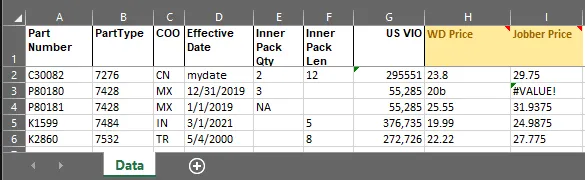
One row per part number.
Template File
T2_Template.xlsx
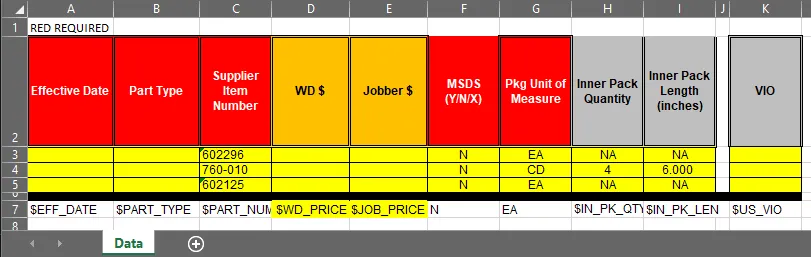
Customer-supplied headings with variables added for processing (on row 7).
Config File
T2.yaml
Description: Sample 2 Loadsheet

Template:
  FileName: "T2_Template.xlsx"
  WorkSheet: "Data"
  DataRow: 7
  Variables:
    - {Name: $PART_NUMBER, Type: "string", Required: true}
    - {Name: $PART_TYPE,   Type: "string", Required: true}
    - {Name: $WD_PRICE,    Type: "float4!", Required: true}
    - {Name: $JOB_PRICE,   Type: "float4!", Required: false}
    - {Name: $IN_PK_QTY,   Type: "number", RequiredIf: "$IN_PK_LEN != nil"}
    - {Name: $IN_PK_LEN,   Type: "number", RequiredIf: "$IN_PK_QTY != nil && $IN_PK_QTY > 1"}
    - {Name: $EFF_DATE,    Type: "date",   Required: true,
        Filter: "$EFF_DATE != nil && $EFF_DATE < Date(p1)"}
    - {Name: $US_VIO,      Type: "number", Required: false}

Sources:
  - Name: Primary
    Description: Main Parts file
    FileName: "T2_Data.xlsx"
    WorkSheet: "Data"
    HeaderRow: 1
    Columns:
      - { Heading: "Part Number",    Format: "part",   TemplateVariable: $PART_NUMBER }
      - { Heading: "PartType",       Format: "text",   TemplateVariable: $PART_TYPE }
      - { Heading: "Inner Pack Qty", Format: "text",   TemplateVariable: $IN_PK_QTY }
      - { Heading: "Inner Pack Len", Format: "text",   TemplateVariable: $IN_PK_LEN }
      - { Heading: "Effective Date", Format: "date",   TemplateVariable: $EFF_DATE }
      - { Heading: "US VIO",         Format: "number", TemplateVariable: $US_VIO }
      - { Heading: "WD Price",       Format: "price",  TemplateVariable: $WD_PRICE }
      - { Heading: "Jobber Price",   Format: "price",  TemplateVariable: $JOB_PRICE }
There are several things to note about this configuration file:
-
The
Templatesection defines the template file, worksheet, and variables used in the loadsheet. -
The
Sourcessection defines the data sources used to populate the template variables. -
Each variable can have additional properties, such as
Required,RequiredIf, andFilter, which control its behavior during validation and processing. -
The
Filterproperty on$EFF_DATEensures that only rows with an effective date before a specified date are included in the output. (p1is a placeholder for the date provided as a parameter when the loadsheet is run.) -
The
RequiredIfandFilterdefinitions protect againstnilvalues, ensuring that the expressions only perform comparisons with actual provided data. -
The source does not include all columns in the source file (ignoring the
COOcolumn). -
The order of the Source Headings do not need to match the order of the columns in the source file, but they do need to match the heading values in the source file exactly.
-
The resulting template file will include native Excel floats for the two pricing columns, displayed with 4 decimal places. This is because “float4!” is specified as the type for those variables. The ”!” indicates that the value is a native Excel number (as opposed to a text representation of the number).
Run Command
loadsheets --config t2.yaml -highlight -params "p1=2020-10-01"

loadsheets (v1.2.0) - populate Excel template with new part data from multiple source files
Copyright (c) Winsby Group LLC. All rights reserved.
Licensed to: DRiV
reading "T2_Data.xlsx:Data"...
writing "C:\samples\sample2\T2_Template_2025-07-22.xlsx"...
Rows Output: 3
Warnings: 6, Elapsed time: 6ms
Results
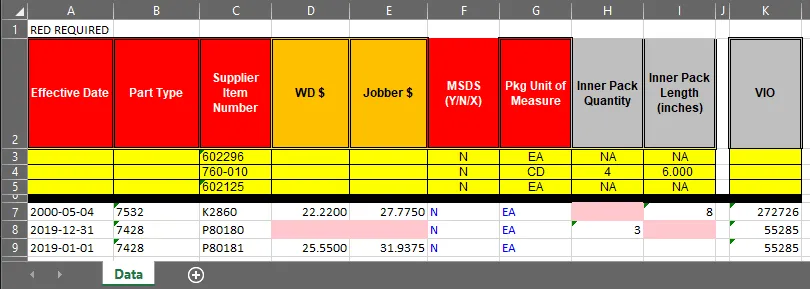
There 4 errors in the resulting spreadsheet (highlighted in red). Let’s look at the log…
Log File
loadsheets (v1.2.0)
Executable:     C:\bin\loadsheets.exe
Launched From:  C:\samples\sample2
Base Directory: C:\samples\sample2
Log File:       C:\samples\sample2\T2_Template.log
Config File:    t2.yaml
Template File:  T2_Template.xlsx
Source Files: 1
  Primary: C:\samples\sample2\T2_Data.xlsx
Run Parameters: [p1=2020-10-01]
Highlighting Errors: yes
Filters: [[$EFF_DATE: $EFF_DATE != nil && $EFF_DATE < Date(p1)]]
error: "C30082" (row 7) value error for $EFF_DATE: "mydate" is not a valid date (yyyy-mm-dd, m/d/yyyy or Excel "Date" format) [T2_Data.xlsx:Data:D2]
error: "K2860" (row 7) (col 8 [H]) missing required value for $IN_PK_QTY (condition "$IN_PK_LEN != nil") [T2_Data.xlsx:Data:E6]
error: "P80180" (row 8) value error for $WD_PRICE: "20b" is not a valid decimal number [T2_Data.xlsx:Data:H3]
error: "P80180" (row 8) value error for $JOB_PRICE: "#VALUE!" is not a valid decimal number [T2_Data.xlsx:Data:I3]
error: "P80180" (row 8) (col 4 [D]) missing required value for $WD_PRICE [T2_Data.xlsx:Data:H3]
error: "P80180" (row 8) (col 9 [I]) missing required value for $IN_PK_LEN (condition "$IN_PK_QTY != nil && $IN_PK_QTY > 1") [T2_Data.xlsx:Data:F3]
Parts Excluded: 2
C30082
K1599
Output file: C:\samples\sample2\T2_Template_2025-07-22.xlsx
Rows Output: 3
2025-07-22 16:40:46: Process completed.
Warnings: 6, Elapsed time: 6ms
There are several things to note about the log file:
-
The
Run Parameterssection shows the parameters passed to the loadsheet (used in the effective date filter). -
The
Filterssection shows the filters applied to the data, including the effective date filter. -
The errors are (1) a bad date format, (2) a missing inner quantity, (3) a bad decimal format, and (4) a missing required value.
-
The
Parts Excludedsection shows which parts were excluded from the output due to errors or filters. -
The output file name includes the current date, which is useful for versioning the output. (This could have been customized in the config file, but we left it as the default.)
❗Note: you should always check the log file for errors and warnings, even if the output file looks correct. Also, you
should probably not use the -highlight option for the final deliverable unless you want the customer to understand that you
recognize there is a problem in those cells.