How to extract a footnote from a part number field
Question: Our interchanges can include a footnote number in our part number column. It is simply separated by a space like this:
PN09001 38
where the “38” is a footnote number that I need to convert to the actual footnote text for PIES (Field N30, Interchange Notes).
Answer: This can be done with a combination of SQL and User Defined columns. Here is a sample SQL statement that splits your partnumber/footnote field into two fields:
select [CompetitorBrand],[CompetitorPart],[OurPart],
  iif(instr([OurPart]," ")>0,mid([OurPart],1,instr([OurPart]," ")-1),[OurPart]) as Part,
  iif(instr([OurPart]," ")>0,mid([OurPart],instr([OurPart]," ")+1),"") as FN
from [InterchangeTable]`
The next step is to create a User Defined Column to translate the FN field into the desired footnote text. Notice that we used the “Map” feature and selected the computed “FN” field defined in our SQL above as the “Source” for the map. The system will then find all of the unique values and display them in a grid for you to enter the actual footnote text.
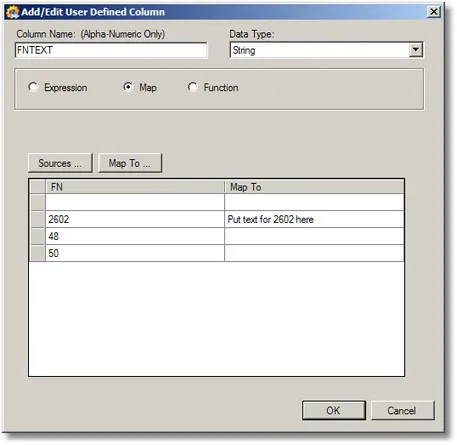
This method is not ideal if the footnotes change often because you would need to remember to update the map. An alternative would be to create a separate source for the map and use the Join feature, but the idea is the same.