Update: PIESCentral 1.3
This is a major release to add support for PIES 6.3 and 6.4.
- This version requires .Net Framework 4.0 instead of 2.0 and also Microsoft Report Viewer 2010 instead of Report Viewer 2005.
.Net Framework 4.0: https://www.microsoft.com/en-us/download/details.aspx?id=17851
Report Viewer 2010: https://www.microsoft.com/en-us/download/details.aspx?id=6442
-
There is a new tab on the Script Definition screen for Multi-Value EXPI. It’s main purpose is to support “Regulating State” and similar items which can have multiple values. The required elements are Part Number, EXPI Code and EXPI Value. This tab can be used for any EXPI element, if it is more convenient (data in source is already in that format). It doesn’t have to be limited to multi-valued EXPI. The elements, Regulating Country, etc. also appear on the original EXPI tab. The original tab can be used for Regulating State, etc., if there is only one value.
-
There is a new Market Copy Maintenance screen to load market copy and digital assets (accessed by Maintain > Market Copy…). Each market copy must be given a unique name, a “Type” (e.g. AAIA Brand) and a “Reference” (e.g. BBBB for the brand code the market copy is referencing). On the Add/Edit Document screen the user can then select by name the Market Copy to include in the document.
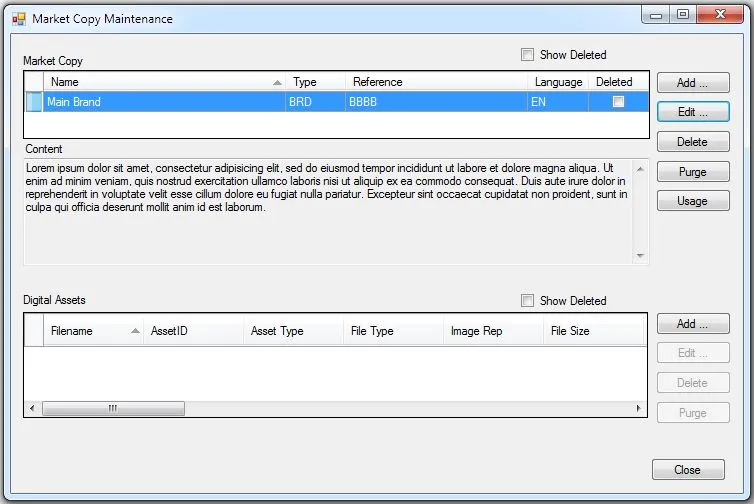
The “Delete” function adds a delete record in the history table so the net change output will include the delete. “Purge” deletes the market copy and all of its history. A delete can be undone. If you check to show deleted and select a deleted market copy, the delete button changes to Undelete.