Comment Auto Mapping
One of the biggest challenges with creating a PartsPRO file is matching your fitment notes to the NAPA “Comment” table. This table is NAPA’s attempt to standardize the way suppliers deliver fitment notes that are not otherwise coded as vehicle attributes (aka “special conditions”).
Unfortunately, over the years, this table has grown to over 240,000 comments, with duplicates, near duplicates and very little standardization.
ProMapper provides two ways to help you map your fitment notes automatically to this diverse set of comments: “Replace Rules” and “Rewrite Rules”.
Replace Rules (aka Substitutions)
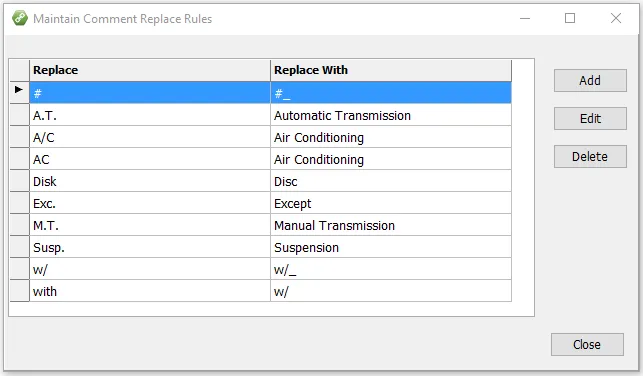
This allows simple replacements to your source data so that it will match what is found in the NAPA comment table. Use an
underbar for a space. For example, w/ => w/_ will add a space after a w/ before doing the lookup (since NAPA usually
uses “w/ ”).
Rewrite Rules (aka Pattern Matching)
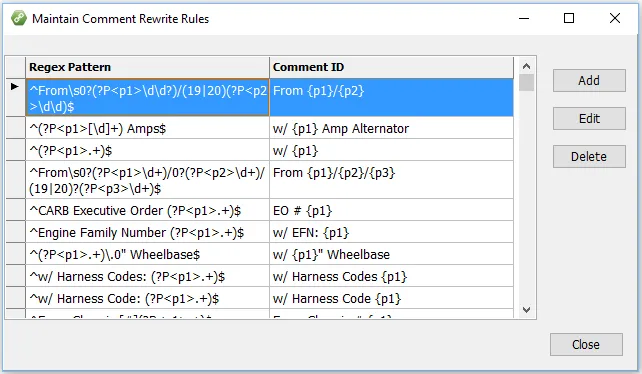
This method uses “regular expression” pattern matching syntax to allow powerful substitutions with parameters. This method is explained further here.
Logic Used for Auto Mapping
The matching works in this order:
-
Check for a comment match first with no changes.
-
Prepend “w/ ” to the comment and look for a match.
-
Apply all replacement rules and check result.
-
For each rewrite rule:
- Apply rule to comment without replacement and check.
- Apply rule to comment with replacements and check.