Positions and Part Descriptions
PartsPro doesn’t support separate positions like ACES does. Positions in PartsPro are always included in the MPCC. ProMapper includes a Position option (as a drop-down) on the Map Part Description screen to limit the source application by position. If set, the selected MPCC will only be used if the source applications has that position.
There are a couple ways to handle positions because there are cases where you might have everything in a position column or the position might be split between the position and embedded in the comment.
For example, you might have “Front” or “Rear” in a source position column and “Left” or “Right” in the comments. In this case, you would select either Front or Rear for the position on the Part Description Mapping screen depending on the MPCC (e.g. the MPCC for Front Left and Front Right would both be tied to Front). On the Map Comments screen, you would map “Left” and “Right” to a “Part Category Map” in the Conditions, tying the application to a single MPCC.
You might also have the case where the “Front Left” and “Front Right” are both tied to Front, but “Left” and “Right” are not on the application (fits both). In this case, two applications will be created, one for each MPCC.
Note that it is important to do the Part Description mapping before the comment mapping if there are positions in the comments.
An example of this mapping would look like below.
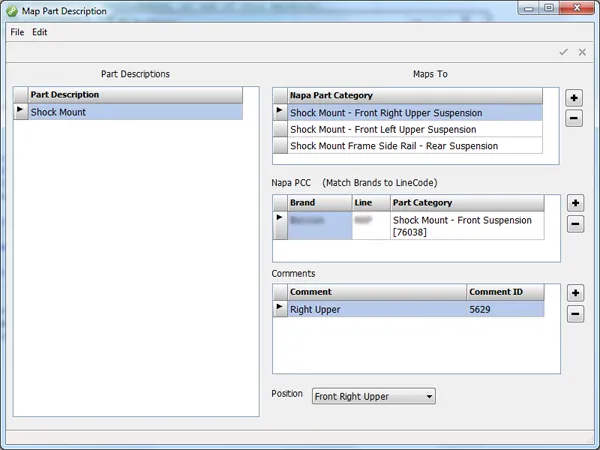
In the top grid, you need to edit the text to make each map unique. The “Position” drop-down is populated with positions from the source file. Selecting a position limits the use of the map to just applications with that position.
In the example above, the “Front Right Upper” position is more detailed than the position in the MPCC (just “Front Suspension”), it is therefore necessary to add a Comment to supply the additional position information (i.e. “Right Upper”).
Limit Map to Position
If there is a position assigned to the source application, then it will only match the part category map that has that same “limit map to position”.
If the source application has no position it will only match part category maps that have not “limit map to position” selected.