Release Notes 1.7.27
ProMapper Software Update
ProMapper version 1.7.27 was released today with new Fuel handling logic and improvements for obsoleted Comments. More information on these changes can be found below.
Fuel Handling Logic
NAPA recently reminded several suppliers to use “Engine Fuel Type” only when absolutely necessary (avoiding “over-mapping”), and especially not used when already included in the “Engine Qualifier”.
ProMapper has always used special “Diesel” Fuel logic to select the correct engine (looking for Diesel in the Engine Qualifier) and then removing Diesel from Engine Fuel Type on output. But this logic did not handle the new Hybrid fuel conditions (e.g. Gas/Electric, Diesel/Electric, Flex/Electric).
This release changes the way NAPA Applications are created to only add Engine Fuel Type to the created NAPA application if more than one Fuel Type was available for the vehicle/engine. In order for this logic to be applied, you need to first “Delete all application maps” for a document, and then re-create.
Fuel Consolidation
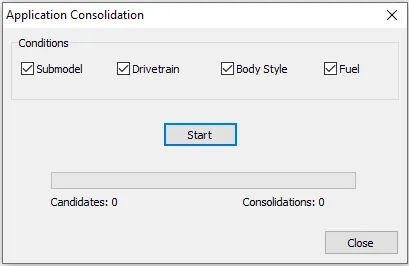
To help remove Fuel Type over-mapping on existing applications, a new option was added to the “Consolidate Applications” function. In addition, the consolidation Conditions have been changed from separate radio buttons to check boxes (so all of the consolidations can be done in one pass).
Comment Clean-Up
NAPA has been busy removing comments they believe to be obsolete. There have been cases, however, where these comments were still being used by ProMapper customers. This has resulted in several problems in recent months causing us to change basic assumptions in our code.

This release corrects another such case where obsolete (i.e. removed) comments were included on a Model map. In these cases, the Model map is now dropped, allowing you to add the correct comment (or request the old one be reinstated).