Features
Supported Features
-
Load
<PriceSheets>from existing PIES file (if present) -
Allow editing of
<PriceSheets>. At least one PriceSheet must be defined. The “PriceSheetNumber” must be unique and is generated from today’s date using a format Preference Setting.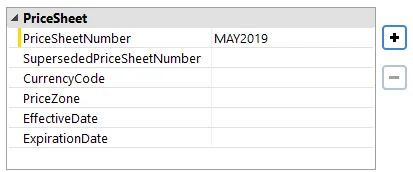
-
If only one PriceSheet is defined, all
<Prices>will use that “PriceSheetNumber”. If more than one PriceSheet is defined, you must include a PriceSheetNumber column in the Pricing spreadsheet. -
Prices may be pulled from an Excel file or delimited text file (.csv, .txt). If a text file, you will be prompted for file structure details.
-
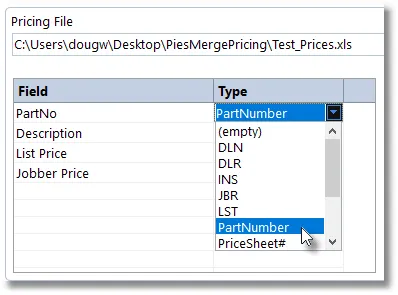
Price columns are associated with field types (PartNumber, Price Levels, etc.) using this grid:
-
Price Levels (codes) are maintained on the Settings screen. A default subset is pre-loaded.
-
Currency Codes (for PriceSheets) are maintained on the Settings screen. A default subset is pre-loaded.
-
Option to append missing part numbers and prices from pricing file to PIES file (or create a new file).
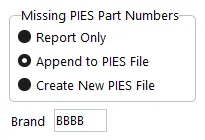
If Append or Create options are selected, you must also supply a valid AutoCare Brand Code. This code will be included in each Item of the PIES file.
-
Statistics, missing prices & part numbers, along with any data problems are logged to an Excel file which can be opened automatically upon completion of the merge.