AceMapper Documents
AceMapper mapping jobs are organized into “Documents.” Originally, a document corresponded to a printed catalog, but this was never a requirement.
Generally, a document should contain one “deliverable” that you want to send separately to a trading partner (with “Net Changes” as an option). Keep in mind that you can’t perform net changes on just a portion of a document.
In most cases, it is better to break a large file containing many part types into smaller documents (but never separating a single part type across documents).
ℹ️Note: There is no reason to create a new document for each update. Simply re-import the full file into the same document and it will retain its mappings and history. In fact, having multiple copies of the same document will negatively impact performance.
Supported Document Types
AceMapper currently supports the processing of three types of files, Legacy AAIA, Structured Data, and ACES xml (aka Standalone).
Legacy AAIA files are coded with AAIA_ID numbers from the (now obsolete) AAIA MM table. This seven digit number represents Year, Make, Model, Submodel, Engine Type, Liters, CC, CID, Fuel, Fuel Delivery, Aspiration, Engine VIN, Engine Designation and Country. When working with Legacy files, you only need to map Comment`s and Part Descriptions because the other information is mapped using the VCdb legacy migration tables. This type of document is no longer generally in use, but is still supported for those companies that developed processes around it using our RetroVCdb product.
Structured files, on the other hand, must include the entire application as it would be represented in your printed catalog. In other words, a structured file must have at least years and makes, and most often will include models or engines. Furthermore, these structured files must have this information segregated (and repeated) in set positions on the record. This can most easily be understood as a spreadsheet of data:
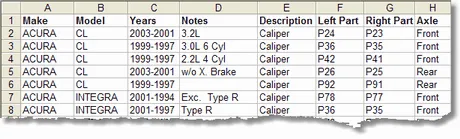 Example Structured File.
Standalone Documents are manually maintained. They can be created from scratch, converted from an existing structured document, or imported from an ACES xml file. These documents are not tied to an external set of application data. No mapping functions are necessary (or available) when working with a Standalone document because they are already in ACES format. This work flow would be used to support many traditional Catalog Management features, or to normalize data from several sources.