Exporting the Grid (Text)
Once an ACES file is loaded, File > Export Grid… lets you save the grid contents to a file.
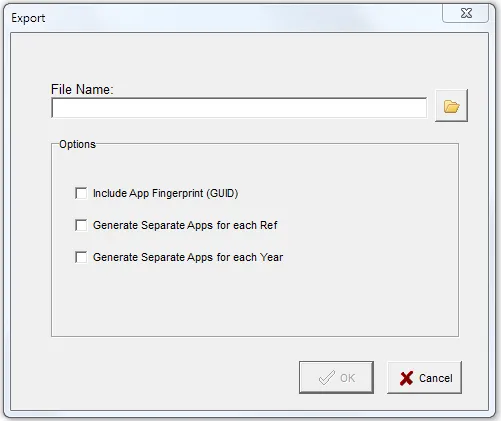
The Export function can create three file formats: .xlsx (Excel workbook), .csv (comma-separated
values), and .txt (tab-delimited). The File Save dialog has a Save as type drop-down, but the file
type is actually determined only by the file extension you provide (.xlsx, .csv, or .txt). Excel is
the default; if you type a file name with no extension, AceViewer adds .xlsx.
Excel output is limited to about 1,048,500 rows (the Excel worksheet maximum). If the grid contains more
rows than that, the Excel option is not offered and you must export to .csv or .txt instead.
Only applications currently visible in the main grid are exported, so any active Filters are honored.
Include App Fingerprint (GUID)
This option creates a single value — the App Fingerprint — that can be used as a primary key to identify the application.
The App Fingerprint is not included in the ACES xml file. ACES has its own app id, but it is not unique; usually it is just a sequential number generated when the xml is written.
The fingerprint is a 128-bit MD5 cryptographic hash of all the fields on the application except the App id and Ref. It is not 100% statistically guaranteed that two different applications will not produce the same hash, but the likelihood is extremely remote.
Generate Separate Apps for each Ref
This option is only available if the loaded file includes ref attributes (typically used to point back to
your source data). Some programs — such as our AceMapper product — combine these source id references in a
comma-separated list when applications are merged.
Selecting this option splits any “ref lists” (such as ref="123, 456, 789") into separate rows, each with a
single ref. This makes it easy to load the export into a database and join back to your source data so you
can compare the source against the ACES output. The ref ids may be separated by a comma, space, or
semicolon.
Generate Separate Apps for each Year
This option separates applications that were expressed as a year range into one row per year.