Sorting Applications
Use View > Sort… (or Ctrl-S) to bring up the sort dialog. Move the columns you want sorted into the right-hand list — you can multi-select. The order of the columns in this list is significant to the sort and can be changed with the up and down arrow buttons. The default direction is ascending for each column; use the +/- button to toggle a column to descending.
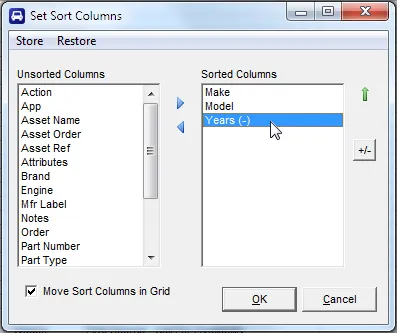
If you check Move Sort Columns in Grid, the sort columns are pulled together at the front of the grid after the sort runs.
To revert back to the natural order of the file, just clear all columns from the sort list.
Part Numbers are ordered intelligently by alpha/numeric segmentation, so A15 sorts before A100.
Use the Store and Restore menu items to save and reapply a single sort definition from the sort screen. Separate Store/Restore slots are kept for each view (Separate Columns vs. combined columns).