Viewing Options
The View menu contains functions that change the way the currently loaded ACES file is displayed.
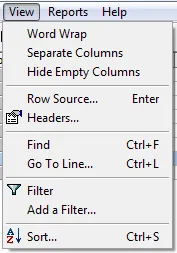
Word Wrap
Use View > Word Wrap to turn in-cell word wrapping on or off. With Word Wrap on, the row height adjusts to fit the deepest cell so you can see all the data. Otherwise text is truncated and can only be seen by widening the column (drag the right side of the column header). Column widths are remembered from one program session to the next.
Separate Columns
Use View > Separate Columns to show each ACES attribute in its own column instead of combining them where possible. This is a toggled feature and shows a check mark next to the menu item when active. In this view, vehicle attribute data is shown raw, exactly as stored in the VCdb, without any decoration.
Hide Empty Columns
Use View > Hide Empty Columns to show only columns that contain data. This may take some time on large files because every row to the end of the file must be examined.