Configurations
All processing jobs are controlled by a configuration file specifically designed for each customer’s requirements. These files are written in a markup language (called YAML) using any text editor (e.g. Notepad++, VS Code, etc.). It is usually easiest to start with an existing config file and make changes as necessary to fit your current requirements.
Besides the configuration file (aka “config” file), we also need a “template” file and at least one “source” file. The template file is simply an Excel file with placeholders for the source data. For example, here is a very simple template file with just four template placeholders (or “variables”):

Note that template variables start with a dollar sign and are all included on a single row. In this example,
we’ve started on row 2, but you can start on any row needed (e.g. some templates have several rows of explanation
at the top and so you’d want to start your data after those lines). There is a DataRow setting in the config
file to indicate which row contains the template variables.
Let’s now look at a source file that we might use to fill this template.
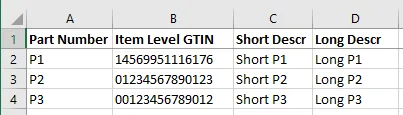
Note that the headings in the source file do not need to match the headings in the template file. Instead, we use the config file to help us match them up.
There are two main sections to a config file, “Template” and “Sources”. The Template section defines the output requirements (for filling in an existing Excel file). The Sources section defines the data inputs that will be used to fill the template.
Minimal Example
Sometimes it is easiest to look at a simple example. Here is a config file that fills a single column (the part number) in the above template file.
Description: Minimal Example

Template:
  FileName: "Template.xlsx"
  WorkSheet: "Data"
  DataRow: 2
  Variables:
    - {Name: $PART_NUMBER, Type: "string", Required: true}

Sources:
  - Name: Primary
    Description: Main Parts file
    FileName: "Data.xlsx"
    WorkSheet: "Data"
    HeaderRow: 1
    Columns:
      - { Heading: "Part Number", Format: "part", TemplateVariable: $PART_NUMBER }
Notice that the Sources section defines a source named Primary with a “Part Number” heading, and this
data column is a "part" format (i.e. a part number type column) whose data should be referenced by the
$PART_NUMBER variable.
If we tried to run with this config against the above data and template files, we’d get an error, however,
because there are three variables defined in the template file ($ITEM_GTIN, $SHORT_DESCR, $LONG_DESCR)
that are not defined in the Template section of the config file.
If we removed the ”$” from those extra variables in the template file, however:

we’d eliminate the errors, and get something like the following:

Note that the part number was properly populated, but why is the other data copied down on each row?
This example shows how you can provide “default” values that never change (and are not provided by a data source).