Sample 1
Two data sources (from the same Excel file) with one using lookup codes. Show GTIN check-digit validation as well as what happens if a lookup code is missing from the config file.
Source Data
T1_Data.xlsx - Main Worksheet
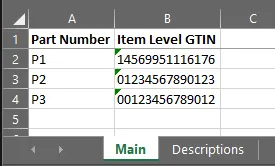
One row per part number.
T1_Data.xlsx - Descriptions Worksheet
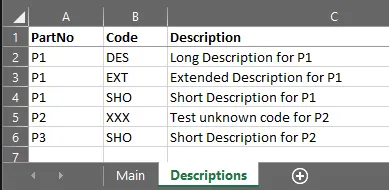
Multiple rows per part number.
The data sources are “joined” by their respective Part Number columns (which in this case use different headings).
Template File
T1_Template.xlsx
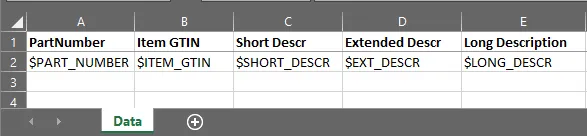
The template file contains customer-supplied headings with a row of variables that we added for processing.
Config File
T1.yaml
Description: Sample 1

Template:
  FileName: "T1_Template.xlsx"
  WorkSheet: "Data"
  DataRow: 2
  Variables:
    - {Name: $PART_NUMBER, Type: "string", Required: true}
    - {Name: $ITEM_GTIN,   Type: "string", Required: true}
    - {Name: $LONG_DESCR,  Type: "string"}
    - {Name: $EXT_DESCR,   Type: "string"}
    - {Name: $SHORT_DESCR, Type: "string", Required: true}

Sources:
  - Name: Main
    Description: Main PIES data file
    FileName: "T1_Data.xlsx"
    WorkSheet: "Main"
    HeaderRow: 1
    Columns:
      - { Heading: "Part Number",     Format: "part",   TemplateVariable: $PART_NUMBER }
      - { Heading: "Item Level GTIN", Format: "gtin14", TemplateVariable: $ITEM_GTIN }

  - Name: Descriptions
    Description: Descriptions in a "stacked" format
    FileName: "T1_Data.xlsx"
    WorkSheet: "Descriptions"
    HeaderRow: 1
    Columns:
      - { Heading: "PartNo",      Format: "part" }
      - { Heading: "Code",        Format: "text", TemplateVariable: "lookup:code" }
      - { Heading: "Description", Format: "text", TemplateVariable: "lookup:value"}
    Codes:
      - { Code: "DES", TemplateVariable: $LONG_DESCR }
      - { Code: "EXT", TemplateVariable: $EXT_DESCR }
      - { Code: "SHO", TemplateVariable: $SHORT_DESCR }
❗Note: we intentionally left out the "XXX" code definition in the Codes section
to show what will happen in that case (cell B5 in the Descriptions worksheet has that value).
Run Command
loadsheets -config t1.yaml -highlight

loadsheets (v1.1.0) - populate Excel template with new part data from multiple source files
Copyright (c) Winsby Group LLC. All rights reserved.
Licensed to: Winsby Group LLC
reading "T1_Data.xlsx:Main"...
reading "T1_Data.xlsx:Descriptions"...
writing "T1_Template_2020-12-05.xlsx"...
Rows Output: 3
Warnings: 3, Elapsed time: 5ms
Results

There are two warnings (highlighted in red) for P2. Let’s look at the log…
Log File
loadsheets (v1.1.0)
Executable:     C:\bin\loadsheets.exe
Launched From:  C:\Samples\Sample1
Base Directory: C:\Samples\Sample1
Log File:       C:\Samples\Sample1\T1_Template.log
Config File:    T1.yaml
Template File:  T1_Template.xlsx
Source Files: 2
  Main: C:\Samples\Sample1\T1_Data.xlsx
  Descriptions: C:\Samples\Sample1\T1_Data.xlsx
Run Parameters: []
Highlighting Errors: yes
Filters: []
Code "XXX" not defined in config file for "Descriptions" (T1_Data.xlsx:Descriptions:B5)
error: "P2" (row 3) value error for $ITEM_GTIN: checkdigit for "01234567890123" should be "8" [T1_Data.xlsx:Main:B3]
error: "P2" (row 3) (col 2 [C]) missing required value for $SHORT_DESCR [T1_Data.xlsx:Descriptions:??]
Parts Excluded: 0
Output file: C:\Samples\Sample1\T1_Template_2020-12-05.xlsx
Rows Output: 3
2020-12-05 14:45:40: Process completed.
Warnings: 3, Elapsed time: 5ms
The errors are (1) the missing code definition (which results in a missing required description), and (2) A bad GTIN number.
💡The output will default to the template file name with the current date appended (e.g. T1_Template_2020-12-05.xlsx).
❗Note: you should always check the log file for errors and warnings, even if the output file looks correct. Also, you
should probably not use the -highlight option for the final deliverable unless you want the customer to understand you
recognize there is a problem in those cells.