Model Mapping “View” Filters
There are five view filters on the Model Mapping screen:
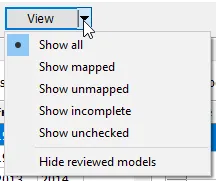
-
Show mapped. Will show just the models that are already mapped.
-
Show unmapped. Will show models that have no “used” maps (or no maps at all)
-
Show incomplete. Will show models with missing year coverage. The list of years not covered for a model is listed under Unmapped Years. This filter can take some time to complete because it performs an analysis on each map and the underlying applications. Many times these show “edge cases” which are off by one year. But in other cases, it shows that there is probably one or more other models you should add to the map.
-
Show unchecked. Will show only those models that have one or more unchecked “Use” maps. Maps are shared available to be used across documents, but must be enabled (by checking the “Use” box on the map).
-
Hide reviewed models. You can mark a model as “Reviewed” with the right-click or Ctrl-R option. This is intended as a way to show that you’ve looked at a model and decided that it cannot be mapped. This option will remove those models from the display.